Updated March 2026: As of GraalVM for JDK 23 (released September 2024), the individual metadata files (
reflect-config.json,resource-config.json,jni-config.json,proxy-config.json, andserialization-config.json) have been consolidated into a singlereachability-metadata.json. The concepts in this post still apply — the structure just lives in one file now. See the update section at the bottom for the current format.
One of the hardest things about compiling a Spring Boot application into a GraalVM native image is generating the necessary reflection, resource and proxy configurations needed for the native image runtime.
These files, placed in the src/main/resources/META-INF/native-image will inform the runtime about all
of the java magic that would be happening in a JVM environment, that isn’t available in the native-image.
Note (2026): The individual files described in this post are deprecated as of GraalVM JDK 23. They’re still accepted by the toolchain, but the modern format consolidates them into
reachability-metadata.json. See the update section at the bottom for details.
When we do a nativeCompile, some native-image metadata is generated by the build process. But it can only see
what information is available at build-time. The recommended way of generating the additional data that isn’t
available at build-time is by using the tracing-agent. It’s fairly documented here on the official GraalVM site
There is a major downside to this tracing-agent process; lets say we have a native-image application with a dozen api endpoints using spring-web-mvc. When a developer updates the application and adds a new endpoint, the metadata hasn’t necessarily been updated to make the native-image runtime aware of the new reflection metadata. So while the application may compile and run correctly, the endpoint will fail at runtime. An example of this will be shown in this post.
To complete the example, we would simply execute the application using the JVM and the tracing agent, and exercise the endpoint. This will inform the tracing agent of what needs to be added to the reflect-config.json and other files.
The goal of this post is to explain exactly what the reflect-config.json file is doing and what information the
tracing agent looks to write.
Test Project
To accomplish this, we’re going to create a new project and go through a typical workflow to build and update a native-image application.
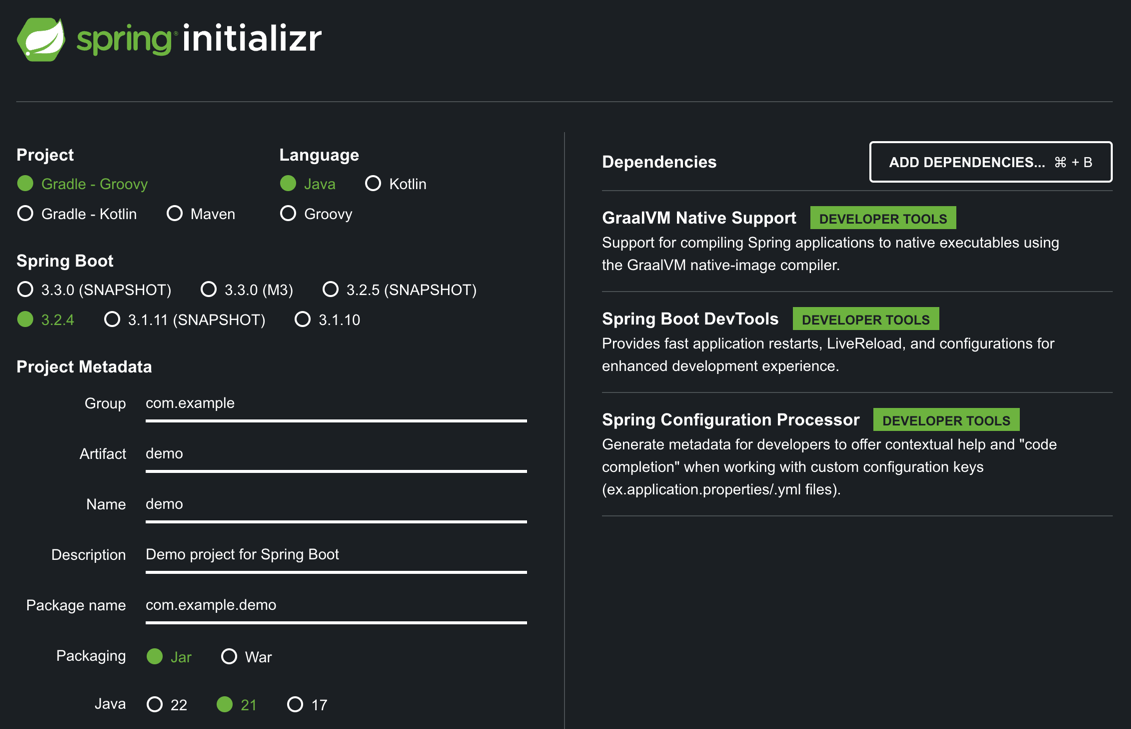
We can use Spring Initializr to generate our test project.
Executing a native run will show the application successfully executing.
  $ ./gradlew nativeRun
  ...
  > Task :nativeRun

  .   ____          _            __ _ _
  /\\ / ___'_ __ _ _(_)_ __  __ _ \ \ \ \
  ( ( )\___ | '_ | '_| | '_ \/ _` | \ \ \ \
  \\/  ___)| |_)| | | | | || (_| |  ) ) ) )
  '  |____| .__|_| |_|_| |_\__, | / / / /
  =========|_|==============|___/=/_/_/_/
  :: Spring Boot ::                (v3.2.4)

  ...  INFO 12345 --- [demo] [           main] com.example.demo.DemoApplication         : Starting AOT-processed DemoApplication using Java 21.0.2 with PID 12345
  ...  INFO 12345 --- [demo] [           main] com.example.demo.DemoApplication         : No active profile set, falling back to 1 default profile: "default"
  ...  INFO 12345 --- [demo] [           main] com.example.demo.DemoApplication         : Started DemoApplication in 0.023 seconds (process running for 0.053)
We need to add some reflection to upset the native-image application. Rather than linking to a github repository, this example is short enough that we can just include it here:
In the following example, we’re gonna call the class automatically in a PostConstruct completely through reflection. At build time, the application has no idea what we’re doing.
  @SpringBootApplication
  public class DemoApplication {
  public static void main(String[] args) {
     SpringApplication.run(DemoApplication.class, args);
  }
  @PostConstruct
  void test() throws ClassNotFoundException, InvocationTargetException, InstantiationException, IllegalAccessException, NoSuchMethodException {
     Class<?> printerClass = Class.forName("com.example.demo.TestPrinter");
     // Class<?>.newInstance() is deprecated, so this example eventually won't work
     TestPrinter printer = (TestPrinter) printerClass.newInstance();
     Method printMethod = printerClass.getDeclaredMethod("print");
     printMethod.setAccessible(true);
     printMethod.invoke(printer);
     }
  }
  class TestPrinter {
     void print() {
        System.out.println("Hello World");
     }
  }
Now that we have some reflection, we’ll execute the same command and see what happens!
  $ ./gradlew nativeRun
  > Task :nativeRun FAILED

  .   ____          _            __ _ _
  /\\ / ___'_ __ _ _(_)_ __  __ _ \ \ \ \
  ( ( )\___ | '_ | '_| | '_ \/ _` | \ \ \ \
  \\/  ___)| |_)| | | | | || (_| |  ) ) ) )
  '  |____| .__|_| |_|_| |_\__, | / / / /
  =========|_|==============|___/=/_/_/_/
  :: Spring Boot ::                (v3.2.4)

  ...  INFO 12346 --- [demo] [           main] com.example.demo.DemoApplication         : Starting AOT-processed DemoApplication using Java 21.0.2 with PID 12346
  ...  INFO 12346 --- [demo] [           main] com.example.demo.DemoApplication         : No active profile set, falling back to 1 default profile: "default"
  ...  WARN 12346 --- [demo] [           main] o.s.c.support.GenericApplicationContext  : Exception encountered during context initialization - cancelling refresh attempt:
     org.springframework.beans.factory.BeanCreationException:
        Error creating bean with name 'demoApplication': com.example.demo.TestPrinter
  ... ERROR 12346 --- [demo] [           main] o.s.boot.SpringApplication               : Application run failed
Reviewing what we know about native-image compilation, this makes perfect sense.
Our specific error that was output in the stacktrace was
Caused by: java.lang.NoSuchMethodException: com.example.demo.TestPrinter.<init>()Lets first execute this application with the tracing agent and see if we can resolve our runtime issue by making the build aware of this reflection at build-time.
Tracing Agent Execution
First, we’re going to run a build with ./gradlew build to create our jvm executable.
Next, we’ll execute our tracing agent execution from the jvm application. We don’t need to explicitly run through any workflows so the tracing agent can see the JVM instantiations, since we do this in a post-construct.
java -agentlib:native-image-agent=config-merge-dir=./config -jar build/libs/demo-0.0.1-SNAPSHOT.jar
The output is what you’d expect from the jvm application version, namely “Hello World” was printed to the console via reflection.
However, in our ./config folder, we now have a handful of native-image metadata files.
Now the tracing agent records everything it can, so even though we’re looking for a single reflection configuration, we ended up with a 49Kb text file with a ton of internal spring reflection registrations. Many of these would be handled at build-time or through reachability metadata. Here’s an example of the type of things the tracing agent picks up additionally:
...
{
    "name":"org.springframework.context.annotation.ComponentScan",
    "queryAllDeclaredMethods":true
},
{
    "name":"org.springframework.context.annotation.ComponentScan$Filter",
    "queryAllDeclaredMethods":true
},
{
    "name":"org.springframework.context.annotation.Conditional",
    "queryAllDeclaredMethods":true
},
{
    "name":"org.springframework.context.annotation.Configuration",
    "queryAllDeclaredMethods":true
},
...
In most cases, just generating the metadata using the tracing agent is the simplest solution. However, for the sake of understanding what’s happening, we’re going to add the file by hand.
First, we’re going to create the location to inject these files into the build process;
creating the src/main/resources/META-INF/native-image directory.
Inside, we’ll create the reflect-config.json file.
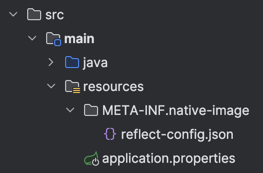
Breaking Down Reflect-Config
Legacy format note: The
reflect-config.jsonwalkthrough below uses the per-file format, which is deprecated as of GraalVM JDK 23 but still accepted. The equivalent configuration in the new unifiedreachability-metadata.jsonformat is shown at the end of this post.
The official GraalVM documentation has examples of all of the available input types for each of the metadata files generated by the tracing agent and used by the native-image build process.
When you need to figure out what to add, using that as a reference will describe the JSON.
Now, lets get into creating this file. Because it is fairly abstract, we’ll build the json as we go and update each piece, rather than display the final file with notes.
It starts with an empty array of json objects:
[{}]Inside, we need to let the build know our class and it’s path
[{
    "name":"com.example.demo.TestPrinter", // Our classname and path
}]
We reflectively create an instance of the object, so we need to let the build know that this class has a constructor.
[{
    "name":"com.example.demo.TestPrinter", // Our classname and path
    "methods":[{
        "name":"<init>",      // representation of the constructor
        "parameterTypes":[]   // no constructor parameters
    }]
]}
Now finally, we need to make it aware of the print method.
[{
    "name":"com.example.demo.TestPrinter", // Our classname and path
    "methods":[{
        "name":"<init>",      // representation of the constructor
        "parameterTypes":[]   // no constructor parameters
    },{
        "name":"print",       // the name of our defined method
        "parameterTypes":[]   // no method parameters
    }]
]}
With just the contents above, we can now rerun our native-image and see if that was enough to inform the build process about the required reflection to execute as we expect!
...  INFO 96340 ... com.example.demo.DemoApplication         : Starting AOT-processed DemoApplication using Java 21.0.2 with PID 12347
...  INFO 96340 ... com.example.demo.DemoApplication         : No active profile set, falling back to 1 default profile: "default"
Hello World
...  INFO 96340 ... com.example.demo.DemoApplication         : Started DemoApplication in 0.025 seconds (process running for 0.052)
Success!!
With the native-image builder made aware of the only required reflection, our app runs perfectly.
Comparing our java execution to our native-image execution shows the order of magnitude increase in startup time, one of the massive benefits of running as a native-image.
Native:  Started DemoApplication in 0.025 seconds (process running for 0.052)
JVM:     Started DemoApplication in 0.415 seconds (process running for 0.658)
Takeaways
Sometimes when writing spring boot native-image applications, we’ll have a complicated workflow that is hard or impossible to catch with the tracing-agent. In these instances, adding the reflection configuration by hand is a perfectly acceptable way to ensure the application will function correctly at runtime.
Update: reachability-metadata.json (GraalVM JDK 23+)
Since writing the original version of this post, GraalVM for JDK 23 (released September 2024) introduced a cleaner approach: all of the individual metadata files have been merged into a single unified file called reachability-metadata.json.
From the official GraalVM JDK 23 release notes:
“Streamlined Native Image reachability metadata configuration into a single file reachability-metadata.json. The formerly-used individual metadata files (reflection-config.json, resource-config.json, and so on) are now deprecated, but will still be accepted.”
The five files that are now deprecated:
reflect-config.jsonresource-config.jsonjni-config.jsonproxy-config.jsonserialization-config.json
Instead of separate files in META-INF/native-image, you now have a single reachability-metadata.json that uses top-level keys for each category:
{
  "reflection": [],
  "resources": { "includes": [], "excludes": [] },
  "jni": [],
  "serialization": []
}
The TestPrinter Example in the New Format
The reflect-config.json I built manually above looks like this in reachability-metadata.json:
{
  "reflection": [
    {
      "type": "com.example.demo.TestPrinter",
      "methods": [
        { "name": "<init>", "parameterTypes": [] },
        { "name": "print", "parameterTypes": [] }
      ]
    }
  ]
}
Two things to notice:
- The file is a JSON object at the top level, not an array — reflection entries go under the
"reflection"key - The class identifier uses
"type"instead of"name"
The rest of the structure (methods, parameterTypes, fields) stays the same.
Spring Boot AOT Integration
For Spring Boot 3+ applications, the Spring AOT engine has already been updated to emit reachability-metadata.json automatically when compiling for GraalVM native images. In most Spring Boot projects you won’t need to write this file by hand — the AOT processor handles it.
When you do need to write it manually (unusual dynamic reflection patterns, third-party libraries the reachability metadata repository doesn’t cover yet), the file goes here:
src/main/resources/META-INF/native-image/<group-id>/<artifact-id>/reachability-metadata.jsonFurther Reading
- GraalVM JDK 23 Release Notes — official announcement of the consolidation
- GraalVM Native Image Metadata Documentation — full schema reference for
reachability-metadata.json - GraalVM GitHub Issue #8534 — technical background on why the format was unified and how backward/forward compatibility works